In an Exchange Server 2019 environment, the Send As permission allows users to send emails on behalf of another mailbox, but it can often obscure the identity of the actual sender during a security audit. This article explores how to use Mailbox Audit Logs to unmask the original user behind delegated emails and outlines the configuration steps required for precise tracking.
Check if user-based AuditLog is enabled.
Get-Mailbox "administrator" | Select-Object AuditEnabled, AuditLogAgeLimit, AuditDelegateSet-Mailbox -Identity "administrator" -AuditEnabled $true
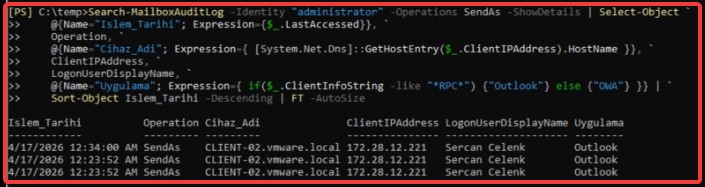
Then, list the emails sent via “Send As” by the user.
Search-MailboxAuditLog -Identity "administrator" -Operations SendAs -ShowDetails | Select-Object `
    @{Name="Islem_Tarihi"; Expression={$_.LastAccessed}}, `
    Operation, `
    @{Name="Cihaz_Adi"; Expression={ [System.Net.Dns]::GetHostEntry($_.ClientIPAddress).HostName }}, `
    ClientIPAddress, `
    LogonUserDisplayName, `
    @{Name="Uygulama"; Expression={ if($_.ClientInfoString -like "*RPC*") {"Outlook"} else {"OWA"} }} | `
    Sort-Object Islem_Tarihi -Descending | FT -AutoSize