

Windows Genişletilmiş Koruma (Extended Protection), Windows Sunucularındaki mevcut kimlik doğrulama sistemini güçlendirerek “araya girme” (Man-in-the-Middle) veya kimlik bilgilerinin başka bir yere yönlendirilmesi gibi siber saldırıları engeller.
Bu koruma yöntemi, özellikle güvenli bağlantılar (SSL) üzerinden gelen trafiği doğrulamak için Kanal Bağlama Bilgisi (CBT) adı verilen bir güvenlik mekanizmasını kullanır.
Bu özellik her bir sanal dizin için manuel olarak açılabilir; ancak Microsoft, bu işlemi tüm sistemde toplu ve hızlı bir şekilde yapabilmeniz için ExchangeExtendedProtectionManagement.ps1 isimli bir PowerShell scripti hazırlamıştır.
Genişletilmiş Koruma durumunu kontrol edin
ExchangeExtendedProtectionManagement.ps1’i çalıştırın ve bir Exchange Sunucusu Sağlık Denetimi raporu oluşturun. Bu, Exchange Sunucusunda Genişletilmiş Korumanın etkin olup olmadığını size gösterecektir.
Exchange Management Shell’i yönetici olarak çalıştırın ve -ShowExtendedProtection parametresini de ekleyerek scripti başlatın.
.\ExchangeExtendedProtectionManagement.ps1 -ShowExtendedProtection
How to enable Exchange Server Extended Protection
DAG yapılandırmanız olsa bile bu adımları mesai saatleri dışında yapın. Bunun nedeni, değişiklikten sonra Outlook istemcilerinin başarılı bir şekilde bağlanabildiğinden emin olmanız gerekmesidir.
Outlook Anywhere için SSL offloading varsayılan olarak etkindir ve Extended Protection için devre dışı bırakılmalıdır.
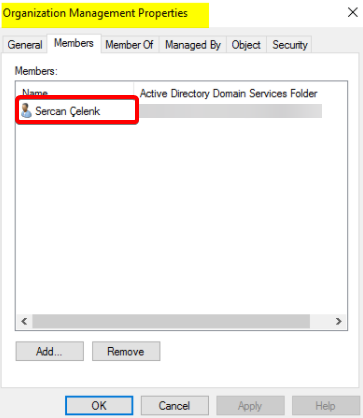
Set-OutlookAnywhere "MAILSRV1\RPC (Default Web Site)" -SSLOffloading $falseKullanıcının Organization Management grubunda olması ve bu betiği yönetici olarak çalıştırılmış bir Exchange Management Shell komut satırı üzerinden yürütmesi gerekir. Kullanıcıyı Organization Management grubuna ekledikten sonra, değişikliklerin etkinleşmesi için oturumu kapatıp tekrar açın.
Hybrid Agent (Exchange Modern Hybrid Topology) üzerinden yayınlanan Exchange sunucularındaki Front-End EWS sanal dizininde Extended Protection etkinleştirilmemelidir.
Exchange Server’da Extented Protection’u etkinleştirmek için PowerShell komut dosyasını çalıştırın.
.\ExchangeExtendedProtectionManagement.ps1Çıktıda Extented Protection’u etkinleştirme hakkında bilgi görüntülenecektir. Y tuşuna ve ardından Enter tuşuna basın.
Version 25.12.17.1435

Enabling Extended Protection
Extended Protection is recommended to be enabled for security reasons. Known Issues: Following scenarios will not work
when Extended Protection is enabled.
    - SSL offloading or SSL termination via Layer 7 load balancing.
    - Exchange Hybrid Features if using Modern Hybrid.
    - Access to Public folders on Exchange 2013 Servers.
You can find more information on: https://aka.ms/ExchangeEPDoc. Do you want to proceed?
[Y] Yes  [A] Yes to All  [N] No  [L] No to All  [S] Suspend  [?] Help (default is "Y"): Y
Script; önkoşul görevlerini işleyecek, applicationHost.config için bir yedek oluşturacak ve Extended Protection yapılandırmasını gerçekleştirecektir.
The following servers have the TLS Configuration below
MAILSRV1

RegistryName        Location                                                                              Value
------------        --------                                                                              -----
SchUseStrongCrypto  SOFTWARE\Microsoft\.NETFramework\v2.0.50727                                           1
SystemTlsVersions   SOFTWARE\Microsoft\.NETFramework\v2.0.50727                                           1
SchUseStrongCrypto  SOFTWARE\Microsoft\.NETFramework\v4.0.30319                                           1
SystemTlsVersions   SOFTWARE\Microsoft\.NETFramework\v4.0.30319                                           1
SchUseStrongCrypto  SOFTWARE\Wow6432Node\Microsoft\.NETFramework\v2.0.50727                               1
SystemTlsVersions   SOFTWARE\Wow6432Node\Microsoft\.NETFramework\v2.0.50727                               1
SchUseStrongCrypto  SOFTWARE\Wow6432Node\Microsoft\.NETFramework\v4.0.30319                               1
SystemTlsVersions   SOFTWARE\Wow6432Node\Microsoft\.NETFramework\v4.0.30319                               1
DisabledByDefault   SYSTEM\CurrentControlSet\Control\SecurityProviders\SCHANNEL\Protocols\TLS 1.0\Client  1
Enabled             SYSTEM\CurrentControlSet\Control\SecurityProviders\SCHANNEL\Protocols\TLS 1.0\Client  0
DisabledByDefault   SYSTEM\CurrentControlSet\Control\SecurityProviders\SCHANNEL\Protocols\TLS 1.0\Server  1
Enabled             SYSTEM\CurrentControlSet\Control\SecurityProviders\SCHANNEL\Protocols\TLS 1.0\Server  0
DisabledByDefault   SYSTEM\CurrentControlSet\Control\SecurityProviders\SCHANNEL\Protocols\TLS 1.1\Client  1
Enabled             SYSTEM\CurrentControlSet\Control\SecurityProviders\SCHANNEL\Protocols\TLS 1.1\Client  0
DisabledByDefault   SYSTEM\CurrentControlSet\Control\SecurityProviders\SCHANNEL\Protocols\TLS 1.1\Server  1
Enabled             SYSTEM\CurrentControlSet\Control\SecurityProviders\SCHANNEL\Protocols\TLS 1.1\Server  0
DisabledByDefault   SYSTEM\CurrentControlSet\Control\SecurityProviders\SCHANNEL\Protocols\TLS 1.2\Client  0
Enabled             SYSTEM\CurrentControlSet\Control\SecurityProviders\SCHANNEL\Protocols\TLS 1.2\Client  1
DisabledByDefault   SYSTEM\CurrentControlSet\Control\SecurityProviders\SCHANNEL\Protocols\TLS 1.2\Server  0
Enabled             SYSTEM\CurrentControlSet\Control\SecurityProviders\SCHANNEL\Protocols\TLS 1.2\Server  1

TLS prerequisites check successfully passed!

All servers that we are trying to currently configure for Extended Protection have RPC (Default Web Site) set to false for SSLOffloading.
EX01-2019: Backing up applicationHost.config.
EX01-2019: Successful backup to C:\Windows\System32\inetSrv\config\applicationHost.cep.20230505220519.bak
EX01-2019: Successfully updated applicationHost.config.

Successfully enabled Extended Protection: MAILSRV1
-ShowExtentedProtection parametresini ekleyerek scripti çalıştırın ve ExtentedProtection’un aktif edildiğini doğrulayın.
.\ExchangeExtendedProtectionManagement.ps1 -ShowExtendedProtection
Version 25.12.17.1435
Results for Server: MAILSRV1

Default Web Site            Value   SupportedValue ConfigSupported RequireSSL     ClientCertificate IPFilterEnabled
----------------            -----   -------------- --------------- ----------     ----------------- ---------------
API                         Require Require                   True True (128-bit) Ignore                      False
Autodiscover                None    None                      True True (128-bit) Ignore                      False
ECP                         Require Require                   True True (128-bit) Ignore                      False
EWS                         Allow   Allow                     True True (128-bit) Ignore                      False
Microsoft-Server-ActiveSync Allow   Allow                     True True (128-bit) Ignore                      False
OAB                         Require Require                   True True (128-bit) Ignore                      False
Powershell                  Require Require                   True False          Accept                      False
OWA                         Require Require                   True True (128-bit) Ignore                      False
RPC                         Require Require                   True True (128-bit) Ignore                      False
MAPI                        Require Require                   True True (128-bit) Ignore                      False
Rollback Exchange Extended Protection
Bu komut, daha önce Extended Protection yapılandırılmış olan ve aktif durumdaki tüm Exchange Server’larda yapılan Extended Protection yapılandırmasını geri alır.(eski haline döndürür)
.\ExchangeExtendedProtectionManagement.ps1 -RollbackType "RestoreConfigurationBu komut, daha önce Extended Protection yapılandırılmış olan ve aktif durumdaki tüm Exchange Server’larda, EWS Backend sanal dizini için uygulanan IP restriction (IP kısıtlaması) korumasını geri yükler.(eski haline döndürür)
.\ExchangeExtendedProtectionManagement.ps1 -RollbackType "RestrictTypeEWSBackend"
Disable Exchange Extended Protection
Bu komut, tüm mevcut yapılandırma konumlarındaki değeri None olarak ayarlayarak, online durumdaki tüm Exchange Server’larda Extended Protection yapılandırmasını devre dışı bırakır.
.\ExchangeExtendedProtectionManagement.ps1 -DisableExtendedProtection
Version 25.12.17.1435
Results for Server: MAILSRV1

Default Web Site            Value SupportedValue ConfigSupported RequireSSL     ClientCertificate IPFilterEnabled
----------------            ----- -------------- --------------- ----------     ----------------- ---------------
API                         None  Require                  False True (128-bit) Ignore                      False
Autodiscover                None  None                      True True (128-bit) Ignore                      False
ECP                         None  Require                  False True (128-bit) Ignore                      False
EWS                         None  Allow                     True True (128-bit) Ignore                      False
Microsoft-Server-ActiveSync None  Allow                     True True (128-bit) Ignore                      False
OAB                         None  Require                  False True (128-bit) Ignore                      False
Powershell                  None  Require                  False False          Accept                      False
OWA                         None  Require                  False True (128-bit) Ignore                      False
RPC                         None  Require                  False False          Ignore                      False
MAPI                        None  Require                  False True (128-bit) Ignore                      False

